


With the Drooms Company Account it is now easier than ever to order Drooms data rooms and services.
As new user, or user without a company account, simply visit our Pricing page, select your Drooms plan, and create your Company Account:
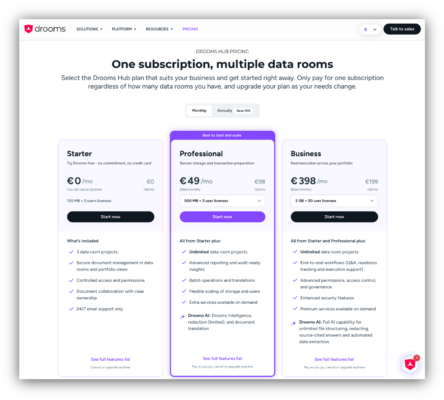
- You can choose between a free Starter plan with limited storage, users, features, and number of projects, or a paid Professional or Business plan with unlimited number of projects, a scalable number of user licenses and provided storage, and different included features and service levels, which can be looked up by clicking on the respective link ‘See full features list’ at the bottom.
- For a Professional or Business plan you have choose between monthly and annual subscription (placed at the top) and then select the needed user licenses and storage tier using the provided drop-down menus (placed above the ‘Start now’ buttons).
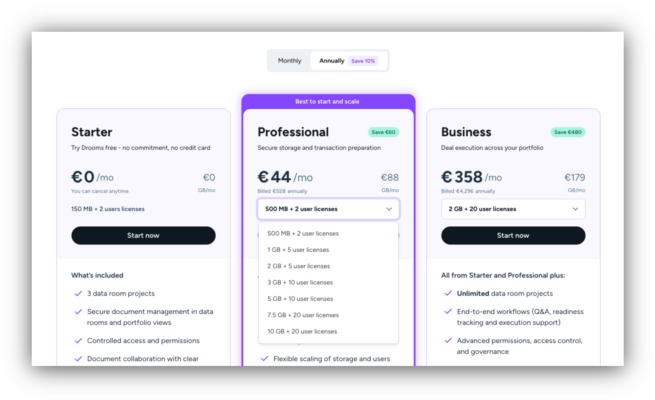
- The resulting monthly or annual subscription fees will be dynamically calculated and displayed. Please note that conditions may be subject to change.
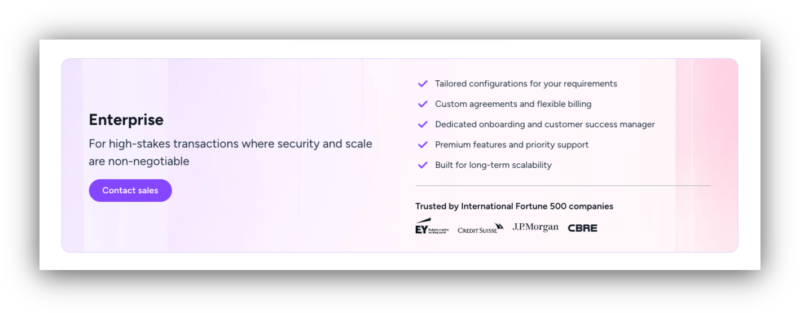
- Alternatively to the offered subscription plans you may contact also our Sales Team and inquire about an Enterprise plan for an individual custom project setup with additional special features beyond our standard subscription plans.
- To finally select your preferred subscription plan and continue click on the respective ‘Start now’ button to proceed to the Account setup page.
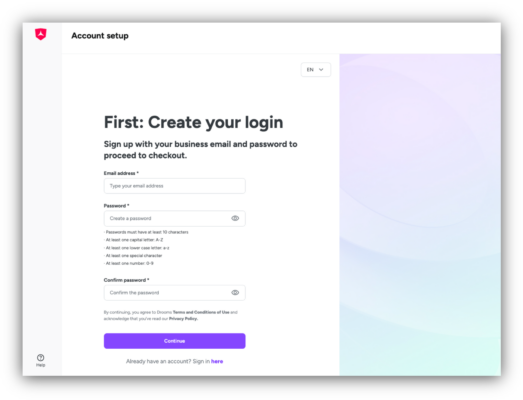
- On the Account setup page, you can click on ‘Sign in here‘ at the bottom to sign in to your Drooms Customer Account with your already existing Drooms user account, or create your Drooms user account first to sign up initially, if Drooms you are a new user:
- Enter your email address and set your password before clicking on ‘Continue’.
- On the next page enter the account verification code that you will have received by email to validate and activate your new Drooms user account.
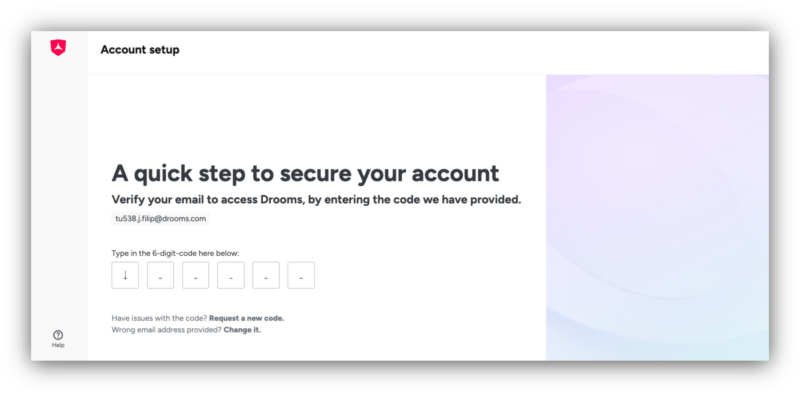
- You will be redirected to your Drooms Customer Account and asked to edit and confirm your cookie settings before before having to sign in to it in with your email address and password.
- After having signed in to the Customer Account for the first time, enter your company profile details (company address and billing address).
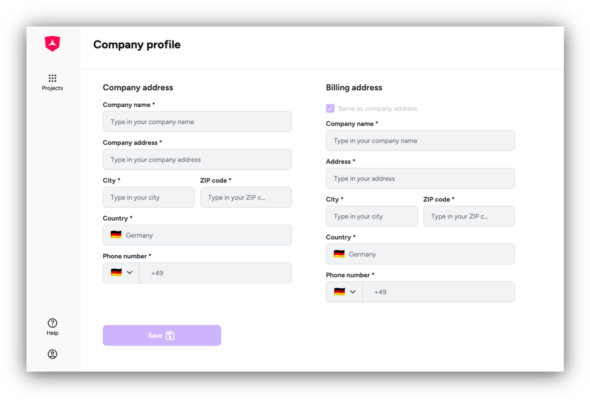
- After clicking on ‘Save’, next select and save your payment method (credit card, PayPal, SEPA, G-Pay) and corresponding payment details. You will be redirected to the Checkout page.
- On the Checkout page review the order summary and accept our Terms & Conditions before finally confirming your order with a click on the ‘Subscribe’ button.
- After subscribing you will be forwarded to the confirmation page for your successful purchase and can now proceed to either manage your company account details, or create your first project.
-> read more about managing your Drooms company account
-> read more about creating projects
Your advantages:
- Clear conditions: Monthly or annual billing cycles, automatic billing based on selected subscription plan and storage tier, automatic contract and subscription renewal unless terminated
- Manage your company account and update your subscription details and payment method any time, upgrades take immediate effect and charges are prorated for the remaining billing period
- Share the Drooms Company Account with other company members
- Open new projects directly in Drooms yourself
Please note:
- downgrades are only possible for storage tiers according to conditions of the selected subscription plan and if the current storage use and numbers of users fit the lower tier
- applicable downgrades take immediate effect like upgrades, the subscription renewal date, i.e., the billing period, remains unchanged
- billing is handled on a calendar-based billing logic
- invoices are generated upon subscription start, subscription renewal, and upgrades
- when a tier is changed during an active billing period, the charges for the current billing period are recalculated on a prorated basis
- the unused portion of a previously selected tier and the price of a newly selected tier are taken into account for the remaining part of the billing term
- the prorated difference in price will be immediately charged for the remaining part of the running billing period, or issued as account credit automatically reducing current or future charges under the same subscription and customer account
- account credits may reduce the amount due to zero (€ 0,00) at the time of a tier change and lower the amount payable at the next subscription renewal, i.e., start of the next billing period
- account credits are not cash refunds, they will be applied only for reducing future invoices or offset unpaid charges
- payments are automatically deducted via the selected payment method for subscription renewals
- if a payment fails, the access to the subscripted service will be restricted, but you may edit your payment method and retry payment via the Company Account billing section
- in case payment remains unsuccessful the subscription will be cancelled automatically on the next billing date
- all prices are tax exclusive, unless stated otherwise
- applicable VAT or local taxes are added based on customer location