


Your company and job data are of strategic business interest for Drooms for focussing on regional, industry- and user-specific topics and future developments.
To edit your company and job data, proceed as follows:
- Sign in to Drooms.
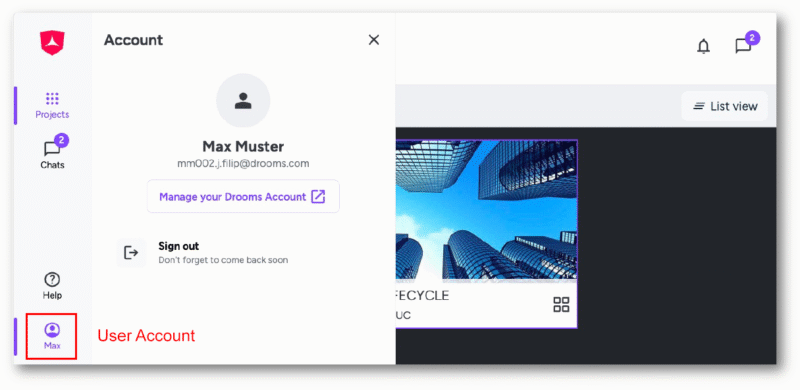
- Click on the bottom drawer (showing your first name) in the vertical main navigation tool bar on the left to open the Account panel.
- Click on ‘Manage your Drooms account’ to open the Account settings page in a separate browser tab, and select second option ‘Company and job data‘.
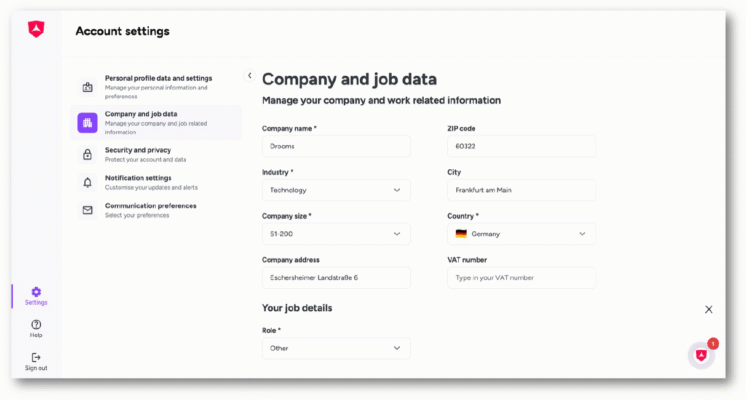
On the right you can manage following information related to your company and work:
- Company name (mandatory)
- Industry (mandatory)
- Company size (mandatory)
- Company address (optional)
- ZIP code (optional)
- City (optional)
- Country (mandatory)
- VAT number (optional)
- Role (mandatory)
Click on ‘Save’ to save any changes, then click on ‘Sign out’ (bottom left corner) and close the browser tab, when finished.