


After their upload, documents are OCRed and processed for online display and advanced features like text search, the AI assistant, redaction, etc., which takes a bit of time for each document.
Despite our efforts to process all documents as fast as possible after the upload, they are not always available in an instant. To be displayed or worked with properly they have to been fully processed.
To follow up on the processing status of uploaded documents, proceed as follows:
- After signing in to Drooms, select the project and data room to which you want to add folders and/or documents, and upload them.
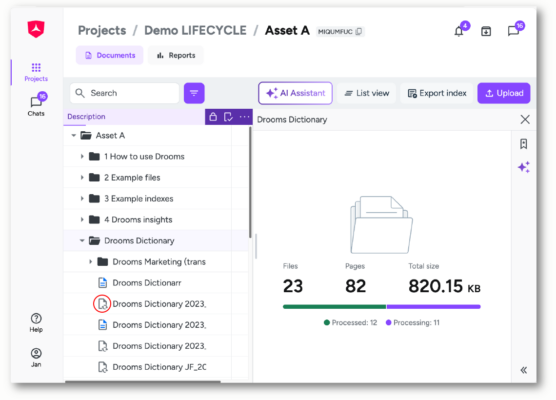
- Click on a target folder in the index to open the folder overview page. During the processing of the uploaded files it will show a progress bar with processed documents vs. documents still in processing.
- If you click on the root folder you can check the processing status of all documents in the data room.
- If you open a target folder with files currently being processed, the Index will display for those an intermediate document status icon (in processing), which will turn into the initial document status icon for newly uploaded, processed, but yet unopened documents, when they have been processed.
- If no no progress bar is shown, then all documents have already been processed,
Please note:
- During processing, following file formats will be converted for online display and use with AI features within the data room: standard .pdf, .png, .jpg, .tif, .tiff, .gif, .txt, .rtf, .xls, .xlsx, .doc., .docx, .ppt, .pptx, .ods, .odt, .odp, .htm, .html.
-
Filres with unsupported file formats like Portfolio PDF files, standard office files with active features like macros, signatures, etc., as well as files with any other format cannot be converted for online display, such as files with 3D content like CAD files, or music files and videos, or compressed files like .zip.
* txt files with more than 400 pages will not be converted, as they are too large to be reviewed on the platform, but spike the page count and cause customers to ask for refunds. These files require download permissions to be actually reviewed.** Excel files without set printing areas and proper formatting, which would be converted into more than 100 pages, will also not be converted, as they will in most cases not be split up reasonably for review, but spike the page count and cause customers to ask for refunds. These files require download permissions to be actually reviewed.
FAQ / Troubleshooting:
- Why can’t I use features like redaction, search, or AI on a document yet?
Because the document has not finished processing after upload. Features such as redaction, search, and AI require the file to be fully converted, OCR-processed, and indexed before they become available. - What does “Processing” mean for a document?
“Processing” means the document is currently going through one or more backend steps, such as file conversion, OCR, search indexing, or entity indexing. During this time, not all features may be available. - What does “Processed” mean, does it mean all files were successfully converted?
“Processed” means the document has completed the processing pipeline. This includes both files that were successfully processed and files that could not be processed (e.g. due to unsupported file types). - What is OCR and what does it stand for?
OCR stands for Optical Character Recognition. It is a technology that converts text within scanned documents or images into machine-readable, searchable text. - Why is OCR important for features like search, redaction, and AI?
Without OCR, the system cannot “read” text that exists only as an image (e.g. a scanned document). OCR makes the text selectable and searchable, which is required for accurate redaction, reliable search results, and AI-based features. - Which features require OCR to work correctly?
Features that rely on understanding document text require OCR, including:
- Full-text search
- Redaction
- Translation
- AI Assistant
- Other upcoming AI features
- How long does document processing usually take?
Processing time depends on file size, number of pages, file type and current system load. Most documents are processed within seconds to minutes, but large or complex documents may take longer. - Can I work with a data room while files are still being processed?
Yes. You can continue uploading, organizing, and reviewing files. However, some features may not be available until processing is complete. - How can I check whether the entire data room has been fully processed?
Select the root folder of the data room. This will show the processing status for all files in the data room, including all subfolders. - What happens if a file cannot be processed (e.g. unsupported file type)?
The file will be marked as processed but certain features will remain unavailable. The document can still be stored and shared, but text-based features such as search, redaction, or AI may not work.