


With a Drooms Plan and your company account in place, there are two ways to create additional Drooms projects: Via your company account, or directly in Drooms.
To create a new project starting in your company Account:
- Sign in to your company account.
- In the vertical navigation menu on the left select the fifth drawer ‘Projects’.
- Click on ‘Create new project’ to be redirected to Drooms (web.drooms.com), and follow below directions.
To create a new project in Drooms:
- Sign in to Drooms (www.drooms.com).
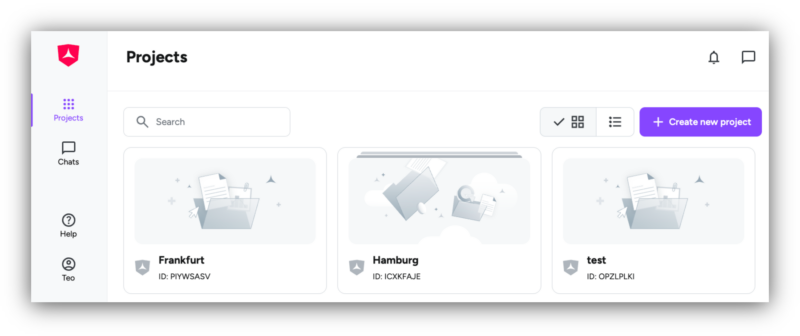
- Click on button ‘Create new project’ at the top right of the Drooms Home page with the Projects overview (only available for Company account administrators).
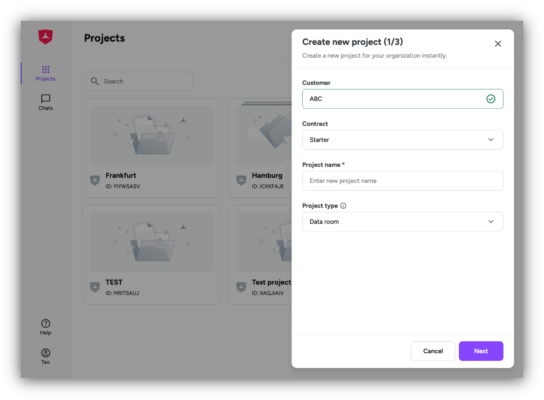
- In the first step, select and enter:
- Customer (company): Usually, at Customer you will see only one option. If you are added to another company as company account administrator, you may see multiple options
- Contract (subscription): Currently, at Contract you will see only one option, as only one subscription per Customer is available. This may change later.
- Project name: Enter the name of your new project
- Project type: Select, whether your project should contain a single data room (option ‘Data room’), or multiple data rooms (option ‘Portfolio’)
- Click ‘Next’ to move to the second step and select the intended project administrator(s), which should be initially invited to the new project. You can choose between any of your Company Account members.
- Click ‘Next’ to move to the third final step, a summary, and confirm your action with a click on ‘Create project’.
- Please note: The maximal number of projects, available storage, and available user licenses depend on your current subscription plan.